自动索引

SQLite 会在一定情况下创建一个自动索引用于帮助提高一个查询的效率,官方文档说明如下:

https://www.sqlite.org/schematab.html
The sqlite_schema.name column will hold the name of the object. (UNIQUE and PRIMARY KEY constraints on tables cause SQLite to create internal indexes with names of the form “sqlite_autoindex_TABLE_N” where TABLE is replaced by the name of the table that contains the constraint and N is an integer beginning with 1 and increasing by one with each constraint seen in the table definition. In a WITHOUT ROWID table, there is no sqlite_schema entry for the PRIMARY KEY, but the “sqlite_autoindex_TABLE_N” name is set aside for the PRIMARY KEY as if the sqlite_schema entry did exist. This will affect the numbering of subsequent UNIQUE constraints. The “sqlite_autoindex_TABLE_N” name is never allocated for an INTEGER PRIMARY KEY, either in rowid tables or WITHOUT ROWID tables.

简单翻译一下:

sqlite_schema.name 列将保存对象的名称。(表上的 UNIQUEPRIMARY KEY 约束会使 SQLite 创建内部索引,其名称形式为 "sqlite_autoindex_TABLE_N",其中 TABLE 被包含约束的表的名称所取代,N 是一个从 1 开始的整数,在表定义中看到的每个约束都加 1。在一个 WITHOUT ROWID 表中,没有用于主键的 sqlite_schema 条目,但是 "sqlite_autoindex_TABLE_N" 名称被设置为主键,就好像 sqlite_schema 条目确实存在一样。这将影响后续 UNIQUE 约束的编号。"sqlite_autoindex_TABLE_N" 名称永远不会分配给一个 [INTEGER PRIMARY KEY](https://www.sqlite.org/lang_createtable.html#rowid),无论是在 rowid 表中还是没有 rowid 表中。

可以总结出来如下几条结论:

  1. 表字段如果存在 UNIQUEPRIMARY KEY 约束,那么 SQLite 会自动给字段创建 "sqlite_autoindex_TABLE_N" 索引;
  2. 对于 PRIMARY KEY 约束,如果字段类型是 INTEGER,不会添加自动索引;
  3. 在一个 WITHOUT ROWID 表中,主键的自动索引不会出现在 sqlite_master 表中 (可以在 pragma_index_list('TABLE') 中查看)。

实际例子看一下,如果本地没有条件,在 https://sqliteonline.com/ 可以在线直接执行查看效果。
先创建 usersposts 表:

1
2
3
4
5
6
7
8
9
10
11
12
13
14
15
16
17
18
CREATE TABLE IF NOT EXISTS users
(
id integer not null
primary key autoincrement,
email TEXT not null unique,
name TEXT
);

CREATE UNIQUE INDEX IF NOT EXISTS users_name_index
ON users (name);


CREATE TABLE IF NOT EXISTS posts
(
title TEXT not null
primary key,
content TEXT
);

查看下索引情况:

1
2
3
4
SELECT a.type, a.name, tbl_name, b.name as col_name
FROM sqlite_master a, pragma_index_xinfo(a.name) b
WHERE type = 'index'
and b.name is not null;

结果如下:

type name tbl_name col_name
index sqlite_autoindex_users_1 users email
index users_name_index users name
index sqlite_autoindex_posts_1 posts title

可以看到 users.id 并没有创建自动索引,非 integer 类型的 primary key 约束和 unique 约束创建了自动索引。

WITHOUT ROWID

再看 WITHOUT ROWID 情况,先创建表 words

1
2
3
4
5
CREATE TABLE IF NOT EXISTS words
(
name TEXT PRIMARY KEY,
desc TEXT UNIQUE
) WITHOUT ROWID;

查询 sqlite_master 表:

1
select * from sqlite_master where tbl_name='words' and type='index';

结果为:

type name tbl_name rootpage sql
index sqlite_autoindex_words_2 words 9 null

表中自动索引序号是 2,并不是 1。接着查询:

1
select * from pragma_index_list('words');

结果为:

seq name unique origin partial
0 sqlite_autoindex_words_2 1 u 0
1 sqlite_autoindex_words_1 1 pk 0

注意 orign 字段,主键 pk 对应的是 sqlite_autoindex_words_1

参考

本文介绍通过 Github ActionsCloudflare Pages 服务两种方式自动部署博客。

Github Actions

生成用于仓库间推送的秘钥:

1
ssh-keygen -f hexo-deploy-key -t rsa -C "l1xnan@qq.com"

其会在当前路径生成两个文件:

  • 私钥: hexo-deploy-key
  • 公钥: hexo-deploy-key.pub

我们将博客源码放在代码仓:

1
https://github.com/l1xnan/blog.git

在此仓库下进入 Settings > Secrets and variables > Actions 中添加一个 Secret,名称为 HEXO_DEPLOY_KEY,值为 hexo-deploy-key 文件内容。后续在 Workflow 中通过名称 HEXO_DEPLOY_KEY 使用这个密钥。

Github Pages 部署在代码仓:

1
https://github.com/l1xnan/l1xnan.github.io.git

在此仓库下进入 Settings > Deploy keys 中添加 Deploy key,值为 hexo-deploy-key.pub 文件内容,同时勾选 Allow write access 选项。

模仿 Hexo 针对 Github Pages 官方帮助做一下调整。在博客源文件仓库 blog 添加文件 Workflow 配置文件.github/workflows/pages.yml,内容如下:

阅读全文 »

如今的开发工具基本都是上开箱即用,并能收获不错的开发体验。但是在中文环境下,开发工具默认的字体设置往往不尽人意。连续几天在几个同事的代码界面上发现了  宋体 、 Monospaced 、 微软雅黑 、 楷体 等,五花八门……

作为一个贫穷的常年穿格格杉的程序员😂,折腾不了衣服,就只能折腾自己编辑器的主题和字体。话说新装一个编辑器第一件事就是选一款心怡的主题,配置一个让眼睛舒服的字体。主题撇开不讲,下面说一下字体。

阅读全文 »

日常记录转至语雀平台,定期整理再更新至博客。

vscode 内无法预览代码的图片,通过插件 Markdown Preview Enhanced 来解决,首先安装此插件,然后 ctrl+shift+P 输入

1
Markdown Preview Enhanced: Extend Parser

调出插件的 parse.js 文件,修改其中的 onWillParseMarkdown 方法:

1
2
3
4
5
6
7
8
9
10
11
12
13
module.exports = {
onWillParseMarkdown: function (markdown) {
return new Promise((resolve, reject) => {
const title = /title:\s*(.*)/.exec(markdown)[1].replace(/\s/, '-')
markdown = markdown.replace(
/\{%\s*asset_img\s*(\S*)\s*(.*)\s+%\}/g,
(whole, $1, $2) => (`![${$2}](${title}/${$1})`)
)
return resolve(markdown)
})
},
... ...
};

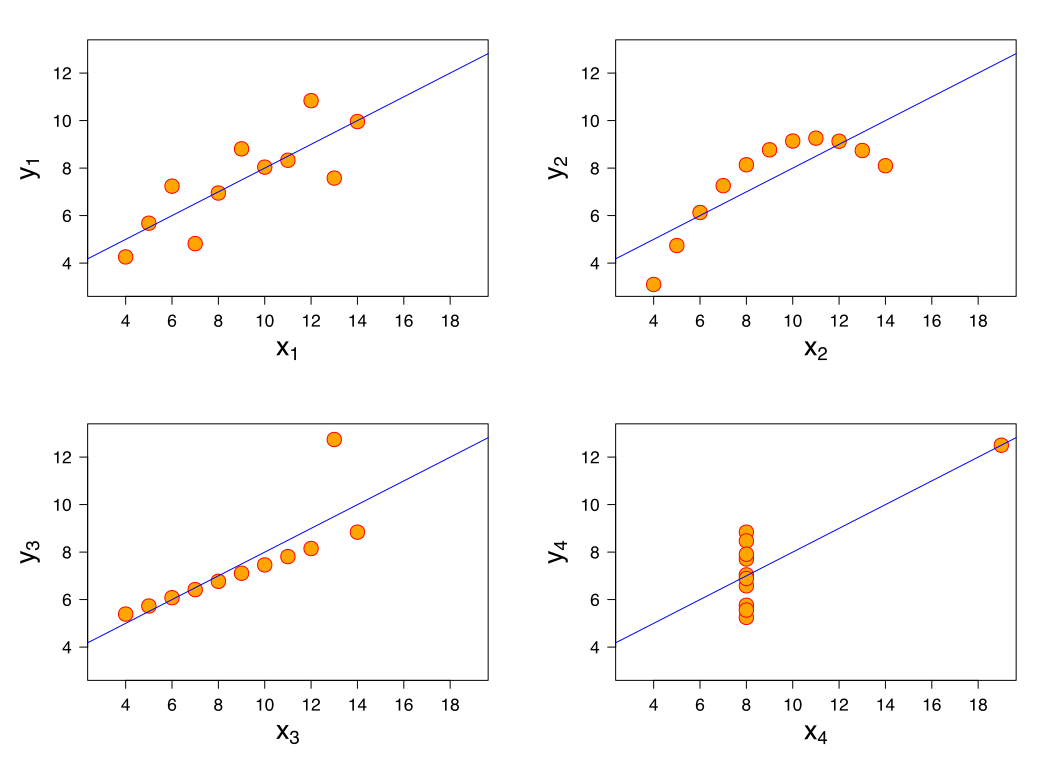
安斯库姆四重奏(Anscombe’s quartet)是四组基本的统计特性一致的数据,但由它们绘制出的图表则截然不同。每一组数据都包括了 11 个 ($x$,$y$) 点。这四组数据由统计学家弗朗西斯・安斯库姆(Francis Anscombe)于 1973 年构造,他的目的是用来说明在分析数据前先绘制图表的重要性,以及离群值对统计的影响之大。
这四组数据的共同统计特性如下:

性质 数值
x 的平均数 9
x 的方差 11
y 的平均数 7.50(精确到小数点后两位)
y 的方差 4.122 或 4.127(精确到小数点后三位)
x 与 y 之间的相关系数 0.816(精确到小数点后三位)
线性回归线 $y=3.00+0.500x$(分别精确到小数点后两位和三位)

参见:Wiki: 安斯库姆四重奏

做数据分析如果用到了数据库作为数据源,pandas 提供了 read_sql 函数,那么如果数据库使用了 SQLAlchemy ORM 该怎么利用这个函数呢?
官方文档上说明可以使用,只是说的比较笼统,具体代码如下:

1
df = pd.read_sql(query.statement, query.session.bind)

如果使用的是 Flask-SQLAlchemy 则可以为:

1
df = pd.read_sql(User.query.filter().statement, db.session.bind)

参考:SQLAlchemy ORM conversion to pandas DataFrame

在使用 Flask-SQLAlchemy 时,如果想调试相关代码,一般和调试 Flask 调试一样,运行

1
flask shell

进入 Shell 环境进行。
注意,原生运行此命令,Shell 环境为默认的 Python 环境,没有 IPython 提供的代码高亮和代码提示。
此时安装 flask-shell-ipython 插件可以解决此问题。

如果不想使用上述插件,我们可以创造一个应用上下文环境,即控制台运行 ipython,进入 IPython 环境,在其中运行代码:

1
2
3
from manage import app, db
ctx = app.app_context()
ctx.push()

这样既创造了一个应用上下文环境。下面我们就可以正常完成数据库的增删查改操作。

如果使用 PyCharm 编辑器,其提供的 Python Console 提供了查看当前变量值等功能更加的方便,同理可以在其中运行上述代码。
每次运行上述代码嫌麻烦,PyCharm 提供了 Starting script 功能,具体操作如下:

Setting > Build, Execution, Deployment > Console > Python Console > Starting script

然后将上述代码,添加到其中,每次运行 Python Console 就能自动加载上述代码。

0%